SEMAA: Agentic AI for Model-Based Systems Engineering
SEMAA brings conversational AI into everyday systems-engineering work, from editing diagrams to working with private engineering data.
Ardalan Aryashad, Rufus Marcussen, Yan Jin — USC IMPACT Laboratory · ASME IDETC-CIE 2026
The problem nobody had solved yet
Model-Based Systems Engineering tools are powerful and notoriously painful. SysML has nine diagram types with their own syntax and semantics. Visual Paradigm and Cameo require you to know what you’re doing before you can even get started. The cognitive overhead of maintaining consistency across a large model is exactly the kind of thing you’d want an AI to help with — and yet, as of late 2025, no one had built a production-ready AI assistant for these tools. There were demos, YouTube videos, early experiments. But nothing that actually lived inside the tool, understood the current diagram state, and could modify it through natural language.
That gap is what SEMAA is about. Not a chatbot that describes what a diagram should look like — an agent that actually creates one and puts it directly into Visual Paradigm.
The plugin: getting inside the tool
The first version was a Java plugin for Visual Paradigm. This was the natural choice: VP has a full Java API that lets you programmatically manipulate the diagram model, and building a plugin means the agent lives inside the engineering environment rather than next to it. The alternative — asking the AI to generate some code and then manually importing it — would have been usable but not the point.
The key design decision was to use PlantUML as an intermediate representation. The agent doesn’t need to know anything about VP’s internal API — it reasons in PlantUML text, and the interpreter handles the translation into actual VP model elements. This decoupling is what makes it work reliably. If I had asked the agent to generate VP-specific API calls directly, the output would have been unpredictable and fragile. PlantUML is well-documented, heavily represented in LLM training data, and text-based, which means the agent can reason about it directly.
The bidirectional interpreter is worth calling out specifically. Before every response, the plugin serializes the active diagram into PlantUML and sends it to the agent as context. This means when you ask “add a component to this diagram,” the agent isn’t guessing what’s already there — it knows. And when you modify something manually in VP, the agent sees the updated state next time it reads. The human and the AI are always working on the same model.
The LibreChat interface at semaa.site — a hosted, self-managed platform where all SEMAA agents live. Engineers can access it from any browser without installing anything.
Beyond standard PlantUML, I had to write a custom syntax for Requirement Diagrams, because PlantUML doesn’t support them natively. This turned out to be a useful exercise — once you’ve built a custom parser for one diagram type, you understand exactly what the interpreter needs from the agent, and you can enforce strict syntax rules in the system prompt. SysML’s Requirement Diagram has specific semantics around containment, derivation, and verification relationships that don’t map to any existing text format.
Growing beyond Visual Paradigm
After the first demo to our sponsors in September 2025, one concern came up immediately: not everyone uses Visual Paradigm. The sponsors were interested in maritime engineering workflows where different tools were in play. And there were capabilities I wanted to add — GraphRAG for document search, fine-tuned models for domain-specific terminology, MCP integration — that would be much cleaner to build as a web service than as VP plugin features.
The solution was to deploy a web-based interface and make the plugin connect to it, rather than expanding the plugin indefinitely.
I evaluated four options: Open WebUI, H2O GPT, LobeChat, and LibreChat. LibreChat won because it hits the right combination for this project: self-hostable, supports multiple AI providers simultaneously (OpenAI, Anthropic, local models), has first-class MCP support, built-in RAG, custom agent definitions, and a clean interface that doesn’t require users to manage anything. I deployed it on DigitalOcean and it’s now live at semaa.site.
The three-tier architecture
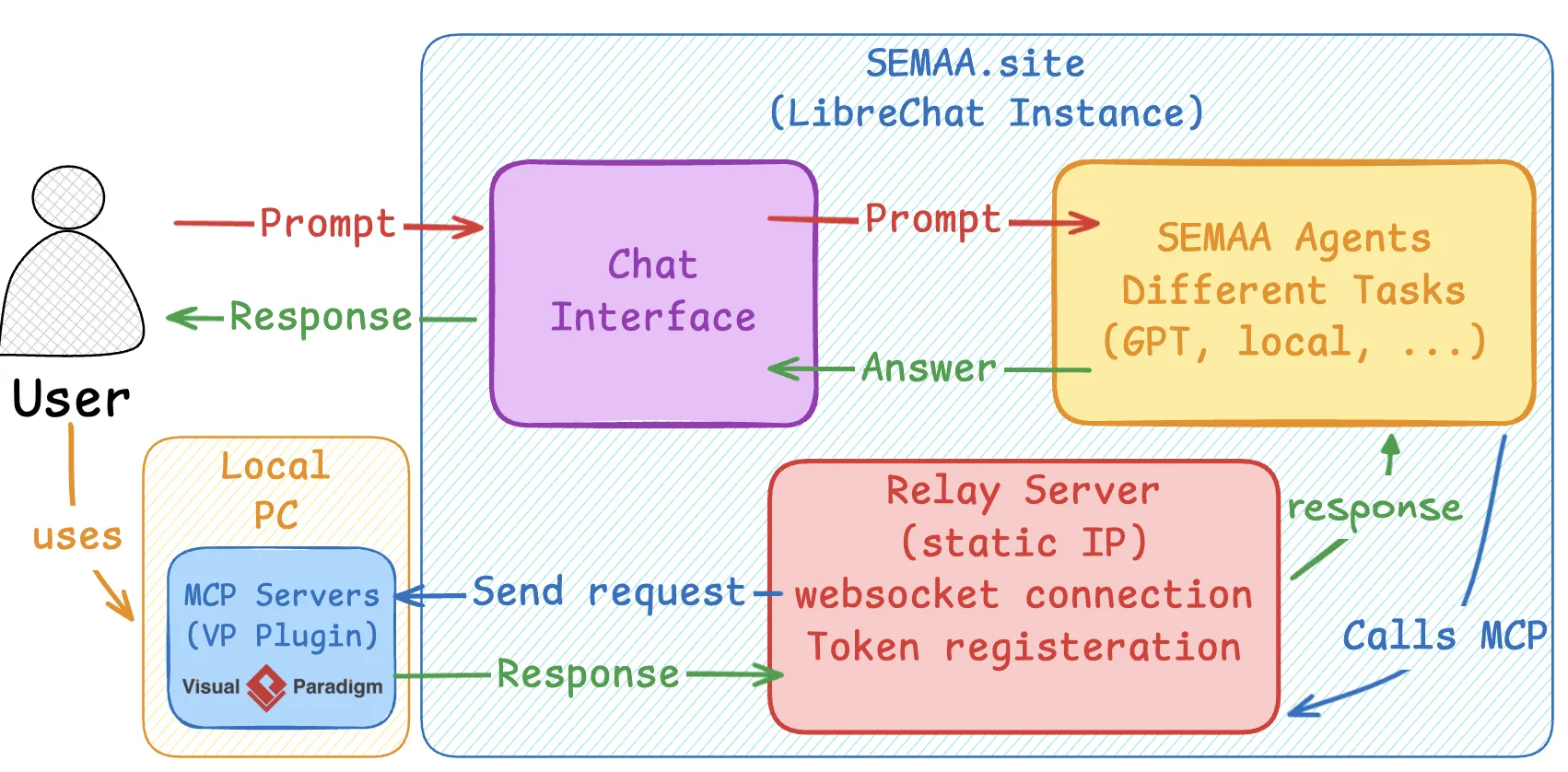
Connecting the VP plugin to a remote server introduced a non-obvious engineering problem. LibreChat’s MCP support requires a static IP — but users run VP on their laptops with dynamic IPs. You can’t register a per-user dynamic endpoint in a way that’s stable enough for MCP.
The solution was a relay server running on the same VPS as LibreChat. When the user clicks “Connect to SEMAA.site” in the VP plugin, the plugin registers a session token with the relay and opens a persistent WebSocket connection. LibreChat talks to the relay at a fixed address; the relay routes commands to the correct user’s VP instance. The user just clicks one button.
The three-tier architecture: the VP plugin on the user's machine talks to a relay server (which solves the static-IP problem for MCP), which routes commands to LibreChat where the agents run. Engineers can use LibreChat directly from any browser without the plugin — the plugin just adds live diagram read/write capabilities.
Diagram generation: what the agent actually produces
When the agent generates a diagram, it produces PlantUML, the interpreter parses it, and VP renders it as an editable model entity. Not a static image — actual model elements you can click on, connect, and modify. The demo above shows this end-to-end: a natural language request becomes a fully editable SysML diagram inside Visual Paradigm in seconds.
The VP plugin in action: natural language request → PlantUML generation → diagram rendered directly in Visual Paradigm. The agent is context-aware — it reads the current diagram before every response.
Multi-agent orchestration: why one agent isn’t enough
The early version was a single agent. It worked, but there was a recurring failure mode: on complex requests involving long requirements documents, the agent would “lose” earlier constraints. The technical term is context rot — when the relevant information is in the middle of a long prompt, retrieval accuracy degrades significantly. For systems engineering, where you might be working with 50-page technical standards, this is a serious problem.
The fix was to decompose the work across four specialized agents:
- Orchestrator — decomposes the request, decides which agents run in what order, keeps the overall goal in focus
- Requirements Agent — reads domain documents, extracts and structures the engineering constraints, prepares a modeling-ready summary
- PlantUML/SysML Generation Agent — receives only the structured requirements and focuses entirely on generating correct syntax
- Evaluation Agent — reviews the output for syntactic validity, structural consistency, and alignment with the original request before it goes to VP
Each agent sees only the context it needs. The PlantUML generator doesn’t have to wade through 20 pages of ClassNK maritime regulations — it receives a clean structured summary from the requirements agent. This scoped context strategy is what makes the orchestrated system faster, not just more accurate.
Benchmarking it: the SEMAA dataset
To actually validate this, I needed a benchmark. There wasn’t one — no standardized dataset exists for AI-assisted MBSE diagram generation. So I built one.
The SEMAA Benchmark covers 12 diagram generation tasks in the cargo shipbuilding domain, using Nippon Kaiji Kyokai (ClassNK) technical standards as the grounding documents. The tasks span three diagram types (sequence, class, use case) across four mechanical subsystems (Autonomous Docking, Cargo Crane, Electrical Power Management, Automated Propulsion). Each task comes with the source technical documents the model is expected to use.
I tested 14 configurations: orchestrated vs. single-agent, across GPT-5.2, GPT-4.1, GPT-5 mini, Codex 5.2, GPT-5 nano, o4-mini, Gemini 3 Fast, and Gemini 3 Thinking. Two ME graduate students scored each output independently on relevancy, complexity, and correctness using a 1–4 rubric.
The results were unambiguous in one direction and surprising in another.
Orchestration wins on quality across every model. The orchestrated GPT-5.2 configuration topped every metric. More interestingly, orchestration improved smaller models proportionally more than large ones — the Evaluation Agent’s syntax check catches errors that smaller models make more frequently.
Orchestration also wins on latency. This was not obvious going in. You’d expect that routing through four agents would be slower than one. But the single-agent GPT-5.2 frequently peaked above 20 seconds, while the orchestrated version averaged 9–10 seconds. The hypothesis is that single-agent context bloat — having to process requirements documents and generate PlantUML simultaneously — causes the model to spend more time on internal reasoning. The orchestrated version breaks the problem into smaller, focused prompts, and the final generation agent can produce code faster because it’s not also synthesizing raw documentation.
The one outlier: orchestrated GPT-5 mini hit 50-second peaks despite decent quality scores. Smaller models seem to struggle with the coordination overhead even when they can handle the individual tasks.
This case study is documented in a paper submitted to ASME IDETC-CIE 2026.
GraphRAG: document intelligence on the platform
LibreChat supports RAG out of the box, but I integrated GraphRAG specifically for the engineering document use case. The difference matters: standard RAG retrieves text chunks at query time. GraphRAG builds a knowledge graph from the documents on ingest — entities, relationships, and cross-references are computed once and stored, so queries can follow multi-hop reasoning paths that chunk retrieval can’t support.
The workflow: an engineer uploads a PDF (a requirements document, a technical standard, a design report), the system ingests it into the graph, and the SEMAA agent can then search and query it to ground its diagram generation in the actual document content. The Evaluation Agent’s job is easier when the Requirements Agent has structured knowledge rather than raw text to work with.
In June 2026, I added a second SEMAA agent at semaa.site — identical in every way except GraphRAG is disabled. The sponsors wanted to see the comparison directly: the same prompt, answered by SEMAA-with-GraphRAG and SEMAA-without, side by side. It makes the value of the grounding concrete rather than abstract.
Private model hosting
One of the sponsor priorities was keeping proprietary engineering documents off external APIs. This pushed me to add support for self-hosted LLMs. The stack I landed on:
- HuggingFace Hub — model storage and versioning for fine-tuned weights
- Modal — on-demand GPU infrastructure, billed per second of compute (no idle cost)
- vLLM — inference engine with efficient batching and KV cache reuse
- LibreChat — API integration layer, so private models appear as a selectable provider in the same UI
The cold start on first request is about 30 seconds depending on model size. After that, responses are fast. The cost model works because the use case is sporadic: engineers aren’t sending continuous queries, so paying only for actual inference time is significantly cheaper than a reserved GPU instance.
OCR pipeline
Engineering documents are often scanned PDFs — image-based, not text-based. Standard PDF text extraction fails completely on these. I built an async OCR pipeline using Docling running on Modal cloud compute. When a user uploads a PDF or image to the chat, the OCR runs in the background. The document shows a “Waiting…” status while processing runs (30–90 seconds for dense technical manuals), and once it’s done, the structured markdown goes directly into GraphRAG. The user can keep chatting while it processes.
The key technical choice was Docling over commercial OCR APIs. Docling is layout-aware — it preserves headings, tables, figure references, and document structure, which is exactly what GraphRAG needs to build an accurate knowledge graph. A commercial API gives back flat text and loses all that structure.
SEMAAPI: project management as a side branch
Running parallel to all of this is an early-stage project called SEMAAPI — the SEMAA Agent for Project Management. The idea: use the OpenAI Agents SDK to build an agent that generates project reports, schedules, and management summaries from engineering documents, then deploy it as a provider in LibreChat alongside the diagramming agents.
The use case is that a project manager uploads a set of meeting notes, design documents, or work packages, and the agent synthesizes them into structured reports: progress summaries, schedule analyses, action item tracking. LibreChat’s multi-provider architecture means this agent sits in the same UI as the MBSE diagramming agent — the engineer doesn’t need another tool.
This is early. The core agent works for basic report generation, but the scheduling and cross-document synthesis capabilities are still being developed.
What didn’t work and what I’d do differently
The relay architecture is functional but has failure modes. A lost WebSocket connection between the plugin and relay breaks the MCP link silently — the agent calls the VP tool, the relay routes the command, but nothing happens. The one-click reconnect flow handles this now, but it took several iterations to make it robust enough that users weren’t spending time debugging connection state instead of working on diagrams.
The SEMAADB benchmark is small. 12 tasks, three diagram types, one domain. It’s enough to show the orchestration effect clearly, but it doesn’t tell you much about performance on block definition diagrams, parametric diagrams, or deployment diagrams. Expanding it is the next research priority.
The latency on smaller orchestrated models (GPT-5 nano hitting 50 seconds) suggests the coordination overhead is non-trivial. For real-time engineering workflows, 50 seconds between a natural language request and a rendered diagram is too slow. The practical recommendation from the evaluation: use large models for complex multi-diagram design sessions and reserve smaller models for incremental edits to existing diagrams.
What’s next
The sandbox agent work from May 2026 is worth expanding. The idea is to run diagram validation inside an isolated Docker container (using the official PlantUML image) before returning results to the user. This catches syntax errors at generation time rather than at import time, and the feedback loop — generate, validate, repair, re-validate — is something the Evaluation Agent can drive automatically. It’s a cleaner version of what the Evaluation Agent does today.
Wiki-LLM is a longer-term direction. Rather than re-deriving knowledge from documents at every query, the idea is to maintain a persistent, LLM-curated knowledge base — entity pages, concept summaries, cross-linked relationships — that accumulates and improves over time. For the maritime engineering domain specifically, where you’re working with the same ClassNK standards repeatedly, this would be significantly more efficient than repeated RAG retrieval.
SysML v2 support is eventually necessary. The current implementation targets SysML v1.6 via Visual Paradigm. SysON, the open-source SysML v2 tool, has web-based architecture and open APIs that would integrate well with the LibreChat-centric platform model. Getting there requires extending the PlantUML interpreter to handle the v2 syntax or replacing it with a different intermediate representation entirely.